LabelJet sends your shipping labels directly to a TSPL thermal label printer over WebUSB — fast, local and private. No downloads, no PDF fumbling, no slow print dialog.
by Projectus B.V.
Built for shops that print shipping labels all day and want it to be instant.
Labels go straight to the printer the moment you print. No detour through your downloads folder or a sluggish print dialog.
All processing happens in your browser. No label data is sent to any server or to us — see our privacy policy.
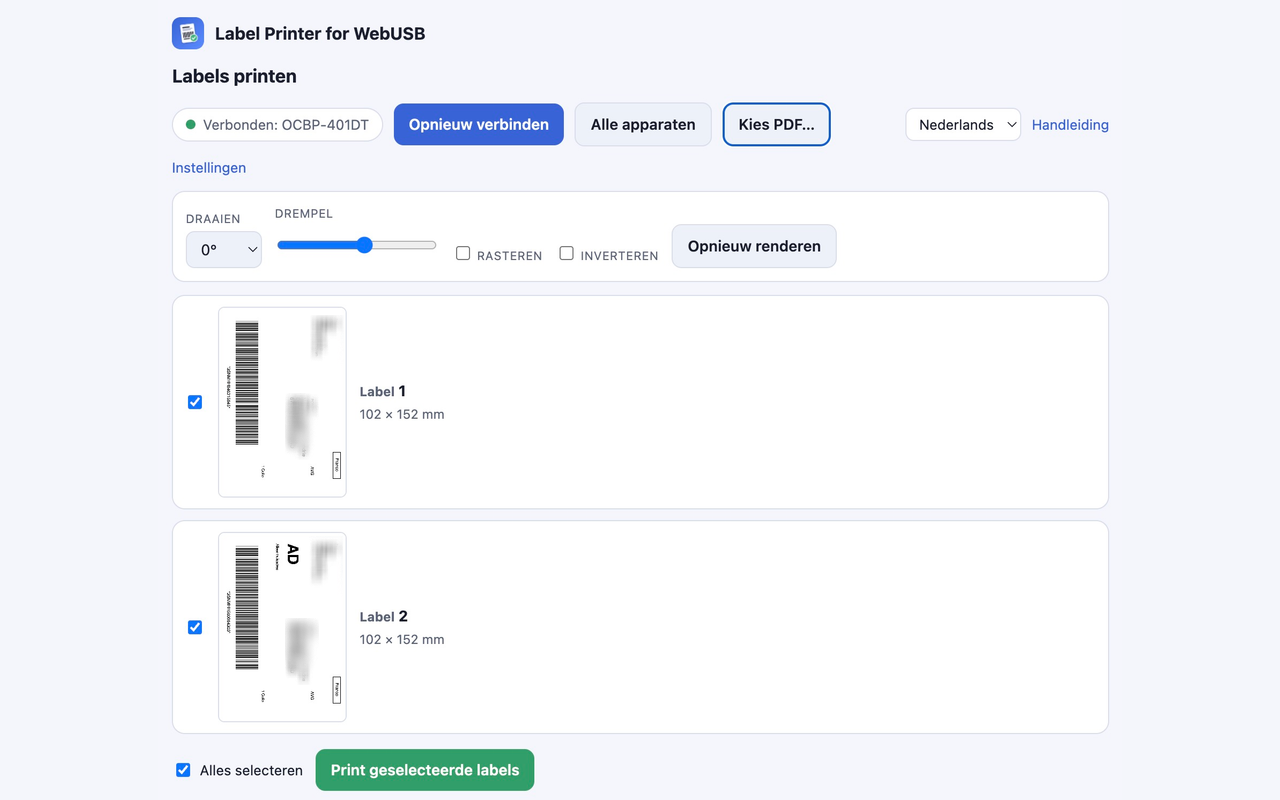
Every label appears with a black/white preview and a checkbox. Print exactly the ones you want.
Label size, gap, density, speed, rotation, threshold, dithering and inverting — tune it to your printer and media.
Chrome, Edge or any Chromium browser with WebUSB, on Windows, macOS, Linux and ChromeOS.
Compatible with TSPL/TSC thermal label printers such as the OCBP-401DT and similar models.
Connect once; after that it just works.
Plug in your TSPL label printer over USB and click “Connect printer” once.
Print your shipping label from your shipping tool. LabelJet opens a window with all labels.
Tick the labels you want, adjust rotation or threshold, and check the preview.
Hit “Print selected labels” — they go straight to your thermal printer.
Clean, light interface — in English or Dutch.


LabelJet processes your labels entirely on your own device and sends them only to the printer you choose. It collects no personal data and transmits nothing to us or to third parties.
No tracking. No analytics. No accounts.
Install LabelJet from the Chrome Web Store and connect your printer in under a minute.
Add to Chrome — it's freeNeed help? Read the user guide.
 LabelJet